GTA Online Hat, Mask and Glasses Glitch: How to Wear All Three at Once
GTA Online normally blocks wearing a hat, mask and glasses together - this working 2026 glitch uses two solo methods, the telescope trick and the Ammu-Nation soda machine, to lock in the combo for good.
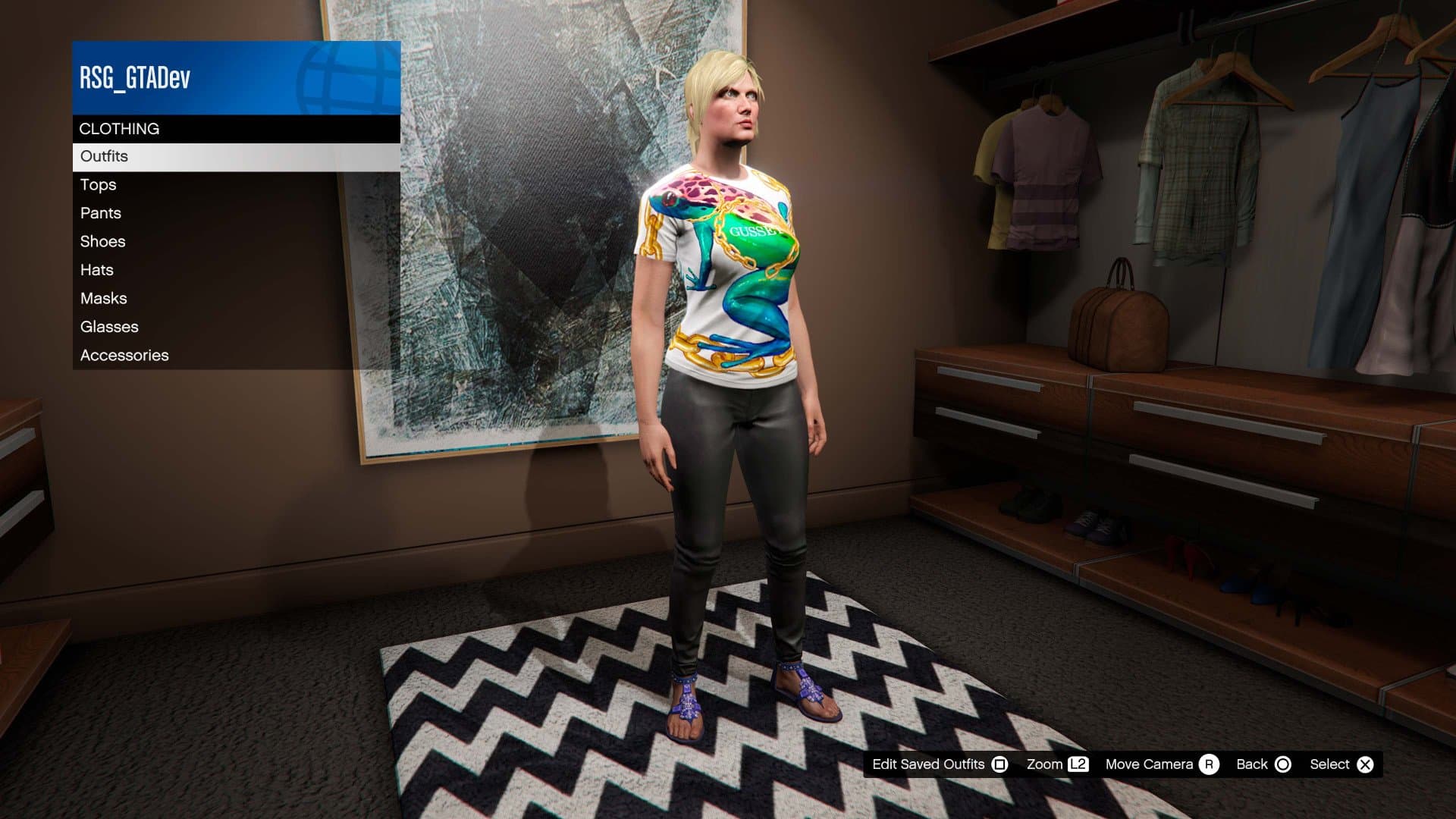
GTA Online will not normally let you equip a mask and glasses at the same time, or stack a hat on top of a full-face mask - but a wardrobe glitch lets you break that rule and lock in the combo permanently. Here is exactly how it works in 2026, using two separate methods so you always have a backup if one gets patched.
The essentials:
- Two working methods: the telescope glitch and the Ammu-Nation soda machine glitch.
- Both work on PC, PS5 and Xbox Series X/S, and both are solo - no second player required.
- The result saves permanently to your outfit slot in the wardrobe, so you only need to do it once per look.
- Always test in an Invite Only session first, in case the animation glitches out your character model.
- Rockstar has patched similar exploits before, so treat any glitch as temporary.
Why Can't You Normally Wear a Hat, Mask and Glasses Together?
The character creator in GTA Online treats headwear, masks and eyewear as competing slots. Equip a ski mask and the game silently unequips your sunglasses; put on a full helmet and most hats or masks vanish. That restriction is by design, meant to stop obviously broken combinations like a motorcycle helmet layered under a beanie. The glitch works by tricking an animation - the telescope or the soda machine - into freezing mid-transition, so the game applies the new item without properly removing the old one.
What You Need Before You Start
- The hat, mask and glasses you want in the final outfit, already purchased and available in your wardrobe.
- Access to a telescope (the ones in your Apartment, Agency or Facility work, as do the public binocular telescopes scattered across Los Santos and Blaine County) or an Ammu-Nation store with a soda machine, such as the one near Simeon's dealership in La Mesa.
- A clean outfit saved as a starting point, so you can undo the glitch if it goes wrong.
- Roughly $1 on hand if you are using a public telescope, since some require a small fee to use.
Method 1: The Telescope Glitch
This is the faster of the two methods and does not require leaving a session.
- Open your interaction menu or wardrobe and equip both your hat/helmet and your mask at the same time. The game allows this pairing already - it is only glasses that get blocked.
- Walk up to any telescope - apartment, Agency, Facility or a public one on the map.
- Run toward it and rapidly tap the interact button (E on PC, right on the d-pad on consoles) as you arrive. Done correctly, your character starts the "look through the telescope" animation but the spam interrupts it before it finishes.
- While the animation is interrupted, open your interaction menu and select your glasses. The game will apply them on top of the mask instead of swapping it out.
- Back away from the telescope. If the glitch worked, your character is now wearing the hat/helmet, the mask and the glasses together.
- Go to any wardrobe or clothing store and save the look as a new outfit. Once it is saved, the combination sticks - you can swap outfits and come back to it without repeating the glitch.
If the mask disappears instead of the glasses, back out, re-equip the hat and mask, and try the telescope again - the timing on the interrupt is the part most players get wrong on the first attempt.
Method 2: The Ammu-Nation Soda Machine Glitch
Use this one as a backup if the telescope stops working after a patch, or if you want to layer a helmet with a mask instead of a hat.
- Save an outfit that includes your desired helmet or hat, then separately equip your bodysuit or ski mask.
- Head to an Ammu-Nation with a soda machine, such as the location near Simeon's in La Mesa.
- Interact with the soda machine, and while your mask is flickering mid-animation, quickly open the pause menu and start a new Invite Only session.
- Set your spawn location to Last Location so you load back in at the same soda machine.
- Once you spawn back in, check the machine - if its purchase options are greyed out, the glitch is holding. Now switch to the saved outfit with your helmet or hat.
- Interact with the machine again to drink a soda, throw the can away, and re-equip your mask mid-animation.
- Save the finished look as an outfit in a wardrobe or clothing store.
This method takes a little longer because of the session swap, but it is more reliable for stacking a full helmet with a mask, which the telescope method sometimes rejects.
Is This Glitch Risky?
Neither method touches money, RP, or anything server-tracked - you are only manipulating an animation state on your own character model, the same category of exploit as older outfit-merge tricks. That makes it low-risk compared to money or duplication glitches, which Rockstar has banned accounts over in the past. Even so, always try it first in an Invite Only session rather than a public lobby, both to avoid a griefer interrupting the animation window and to keep the experiment away from other players in case your character model glitches visually.
Will Rockstar Patch This?
Probably, eventually. Rockstar has closed versions of this exact glitch multiple times going back to the original 2015 telescope trick, and each patch is usually followed within weeks by a new workaround using a different animation - the Ammu-Nation soda machine method exists precisely because an older route got fixed. If one method stops working after a title update, check back for the other, or look for a freshly updated tutorial before assuming the whole trick is dead.
Other GTA Online Glitches Worth Knowing
The mask, hat and glasses combo is part of a long tradition of GTA Online outfit and mechanic exploits. If you want more of the game's history of bugs turned into features, read up on the GTA Online garage duplication glitch that briefly made players millionaires, the North Yankton glitch that let players revisit a story-mode-only map, or the Blue Hell glitch for falling underneath Los Santos entirely. For a broader look at the era when these tricks were everywhere, see our history of GTA Online money glitches from 2013-2014 and the original 2013 car duplication glitch.
FAQ
Does this glitch work on PS4 or Xbox One?
Both methods have been reported working across current-gen and last-gen consoles as well as PC, since they rely on animation timing rather than a platform-specific bug. If one fails on older hardware, the other is worth trying instead.
Do I need a second player to do this?
No. Both the telescope and Ammu-Nation methods are entirely solo.
Can I lose my outfit or get banned for using this glitch?
There is no confirmed ban wave tied to cosmetic-only outfit glitches like this one, since it does not generate money or duplicate items. Saving the outfit afterward locks it in, so there is little risk of losing progress - worst case, the glitch simply fails and your character reverts to normal.
What if the glitch stops working after an update?
Try the other method first. If both fail, it usually means Rockstar has patched the underlying animation exploit, and you will need to wait for the community to find a new workaround - which typically surfaces within a few weeks of a major patch.
Comments (0)
No comments yet. Be the first!